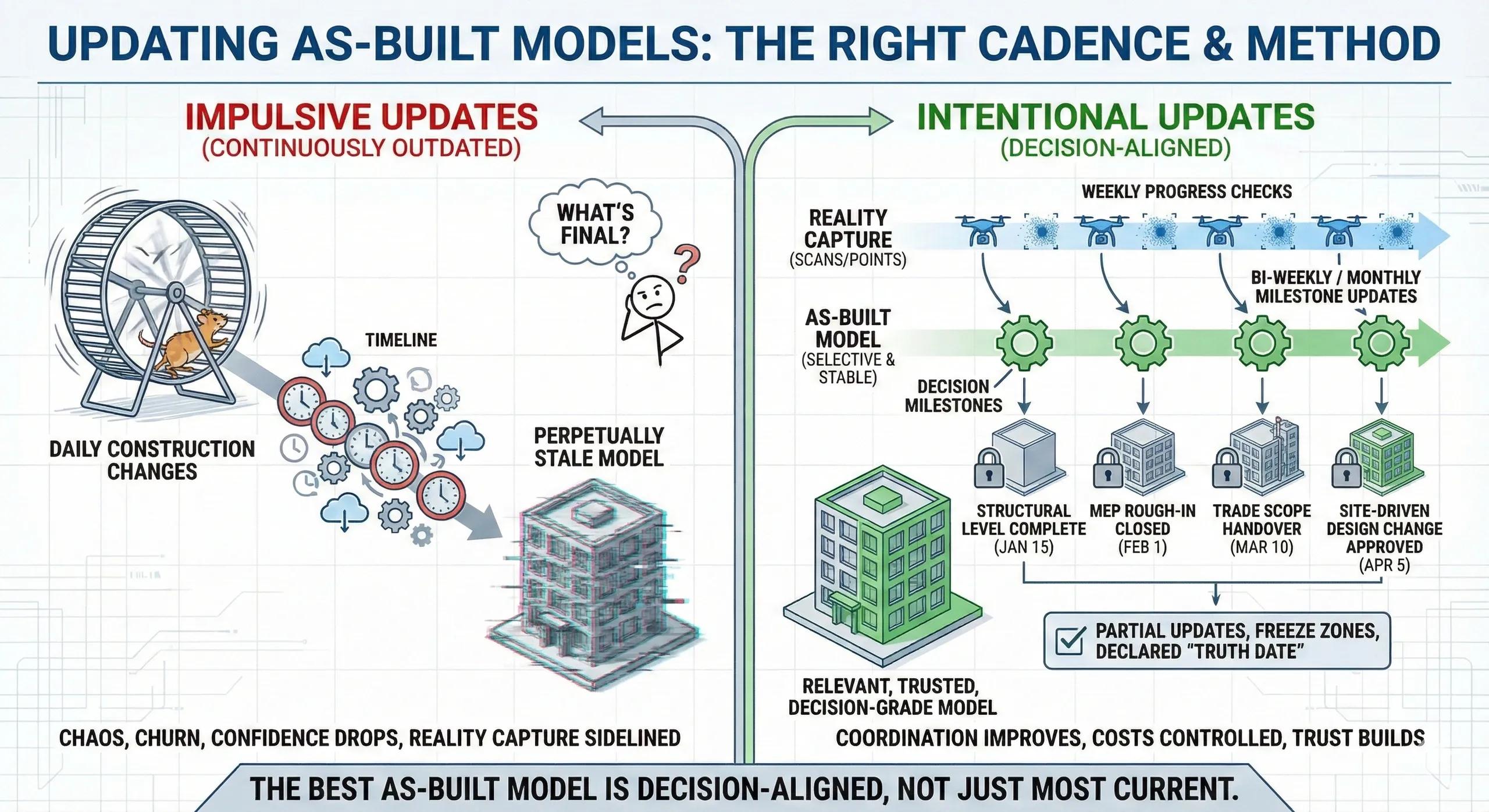
One of the quiet killers of BIM credibility on construction projects is the outdated as-built model .
Teams invest in scans, modeling, and coordination, only to realize weeks later that the “as-built” model no longer reflects site reality. At that point, trust erodes. People stop opening the model. Screenshots replace data. Decisions revert to gut feel.
The issue is rarely how as-built models are updated.
It is when and how often they are updated.
This article explains how to define the right update cadence for as-built models so that BIM remains usable, trusted, and decision-grade throughout construction.
1. The Myth of the Continuously Updated As-Built
Many projects aim for a continuously up-to-date as-built model.
In practice, this fails because:
Construction changes daily
Modeling lags reality
Approval cycles slow updates
Teams disagree on “what’s final”
Trying to update everything all the time produces perpetually stale models .
As-built updates must be intentional , not constant.
2. As-Built ≠ Reality Snapshot
A key distinction:
Reality data (scans, point clouds) can be frequent
As-built models should be selective and stable
Reality data captures what exists now .
As-built models represent what is agreed and locked .
Confusing the two leads to chaos.
3. Update Frequency Depends on Decision Cycles
As-built models should update in sync with decision milestones , not capture frequency.
Typical patterns:
Weekly → Reality capture (progress, deviation checks)
Bi-weekly / Monthly → Selective model updates
Milestone-based → Structural, MEP, and system lock-ins
Updating models without a decision trigger adds cost, not value.
4. What Should Trigger an As-Built Update
Valid triggers include:
Completion of a structural level
Closure of MEP rough-in zones
Approval of site-driven design changes
Resolution of deviation beyond tolerance
Handover of a trade scope
Invalid triggers:
Minor temporary changes
Early-stage installations
Provisional routing
Only accepted reality belongs in the as-built model.
5. Partial Updates Beat Full Rebuilds
As-built updates should be zone-based , not global.
Best practice:
Update only affected levels or areas
Freeze completed zones
Avoid reprocessing the entire model
This keeps:
Update cycles short
Model stability high
Coordination focused
6. As-Built Models Must Declare Their “Truth Date”
Every as-built model must answer one question clearly:
As built… as of when?
Without a declared timestamp:
Models get misused
Coordination errors multiply
Claims become ambiguous
Time-stamping builds trust.
7. Handling Deviations Without Remodeling Everything
Not every deviation requires geometry changes.
Use:
Deviation reports
Metadata notes
Linked snapshots
Remodel only when:
Design intent changes
Downstream work depends on it
This avoids unnecessary churn.
8. As-Built Updates in the Indian Context
On Indian sites:
Design evolves during execution
Approval cycles vary
Cost sensitivity is high
A practical strategy:
Keep BIM lean during execution
Rely on scans for weekly control
Update models at contractual or trade milestones
This balances accuracy with affordability.
9. As-Built Models for Handover vs Construction
Construction-phase as-built models are working models .
Handover as-built models are records of responsibility .
Do not force construction models to serve both purposes simultaneously.
Define:
Construction as-built cadence
Final handover modeling scope
Upfront clarity prevents conflict.
10. A Simple Update Rule
Before updating an as-built model, ask:
What decision will this updated geometry enable that the current model cannot?
If the answer is unclear, wait.
Conclusion
As-built models lose value not because they are inaccurate, but because they are out of sync with decision-making .
When updated intentionally:
BIM stays relevant
Teams trust the model
Coordination improves
Costs stay controlled
When updated impulsively:
Models churn
Confidence drops
Reality capture gets sidelined
In BIM-to-field workflows, the best as-built model is not the most current one, it is the most decision-aligned one .