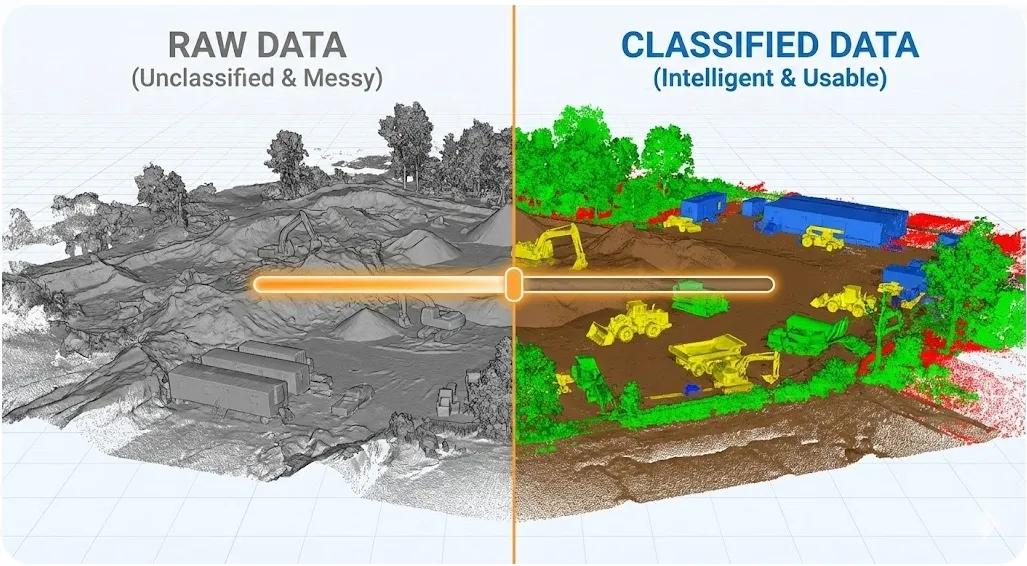
Point clouds are often treated as raw reality, dense, accurate, and authoritative. But in construction workflows, raw point clouds are not immediately useful . They must be interpreted, organized, and filtered before they can support decisions.
This is where point cloud classification becomes critical.
Without classification, point clouds overwhelm BIM teams, slow down workflows, and limit adoption in the field. With proper classification, the same data becomes searchable, measurable, and actionable, supporting layout checks, progress tracking, deviation analysis, and digital twin updates.
This article explains why point cloud classification matters in construction , how it should be structured, and how it bridges reality capture with BIM-to-field execution.
1. Why Raw Point Clouds Fail on Construction Projects
A raw point cloud contains millions, or billions, of points, all treated equally.
Field and BIM teams struggle because:
Everything looks the same
Elements are hard to isolate
File sizes are massive
Viewers become slow
Deviation analysis becomes manual
Reality capture becomes a visual reference instead of a decision asset .
Classification transforms “points” into meaning .
2. What Point Cloud Classification Actually Means
Point cloud classification is the process of:
Grouping points into logical categories
Assigning semantic meaning
Separating construction-relevant elements
Typical classes include:
Ground
Structure
Slabs
Columns
Beams
Walls
MEP systems
Temporary works
Equipment
Once classified, point clouds behave more like spatial databases than static files.
3. Why Construction Needs Different Classes Than Surveying
Survey workflows typically classify:
Ground
Vegetation
Buildings
Noise
Construction workflows require finer granularity.
Construction-focused classification supports:
Element-level comparison with BIM
Phase-wise progress tracking
Trade-specific analysis
Safety and access validation
Using survey-grade classification alone limits construction value.
4. Manual vs Automated Classification
Manual Classification
✔ High control
✔ Suitable for critical zones
✖ Time-consuming
✖ Not scalable
Automated Classification
✔ Fast
✔ Scalable
✔ Suitable for repetitive elements
✖ Requires validation
✖ Dependent on training data
Best practice is hybrid :
Automated classification for bulk data
Manual refinement at critical interfaces
5. Classification by Construction Phase
Classification should evolve with the project.
Early Stages
Ground
Excavation
Foundations
Structural Phase
Columns
Beams
Slabs
Cores
MEP Phase
Ducts
Pipes
Cable trays
Equipment
Fit-Out
Walls
Ceilings
Finishes
Static classification schemas fail to support dynamic construction needs.
6. Enabling BIM Comparison Through Classification
Classification allows:
Point cloud elements to be filtered
BIM elements to be matched
Deviations to be measured precisely
Instead of comparing “everything vs everything,” teams can compare:
Slab vs slab
Column vs column
Duct vs duct
This dramatically improves accuracy and review speed.
7. Classification and Tolerance Checking
Tolerance checks depend on isolation.
Example:
Checking column verticality
Verifying slab flatness
Validating MEP alignment
Without classification:
Noise corrupts results
Measurements become unreliable
With classification:
Only relevant points are considered
Results become defensible
8. Field-Friendly Point Clouds
For field deployment:
Classified point clouds load faster
Relevant classes can be toggled
Mobile viewers remain usable
Field teams don’t need all points, only the right ones .
9. Common Classification Mistakes
Over-classifying too early
Using survey-only schemas
Ignoring temporary works
No documentation of class definitions
Treating classification as a one-time task
Classification must evolve with construction reality.
10. Point Cloud Classification and Digital Twins
Digital twins rely on:
Structured reality data
Time-stamped updates
Element-level intelligence
Classification enables:
Automated updates
Progress state tracking
Asset verification
Without classification, point clouds remain disconnected snapshots.
Conclusion
Point clouds are not useful because they are dense.
They are useful because they can be understood .
Point cloud classification:
Turns reality into structured information
Enables BIM comparison
Supports field execution
Improves performance and usability
Lays the foundation for digital twins
In BIM-to-field workflows, classification is what turns reality capture into construction intelligence .