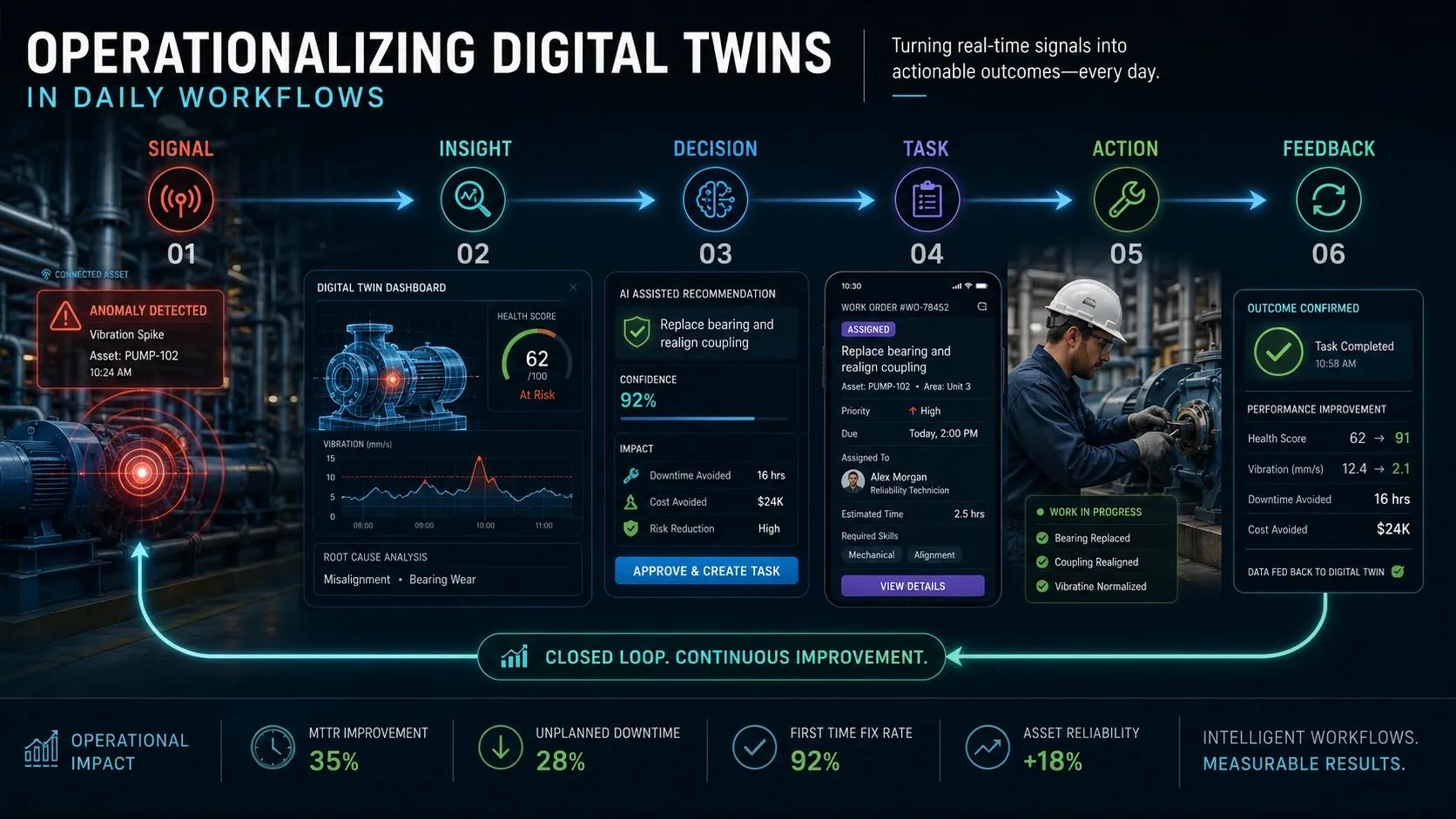
A Digital Twin creates value only when people use it in daily decisions.
Not once in a review meeting.
Not only during a crisis.
But every day.
Introduction: Phase 4 Continuation
In Day 43, we discussed why many Digital Twin projects stall after the pilot stage.
One major reason is simple:
👉 the Digital Twin is built as a system, but not embedded into daily work.
Teams may have access to dashboards.
Managers may review reports.
Executives may see impressive visuals.
But if field teams, planners, operators, and decision-makers still work through old processes:
👉 the Digital Twin remains outside the business.
That is why operationalization matters.
The real question is not:
👉 Can the Digital Twin work?
The real question is:
👉 Can people work through the Digital Twin every day?
The Core Problem: Digital Twins Stay Separate from Workflows
Many Digital Twin implementations exist as:
separate dashboards
standalone command centers
isolated analytics tools
reporting systems
But daily work happens elsewhere:
Excel sheets
WhatsApp groups
ERP systems
maintenance tools
field inspection apps
manual approval chains
This creates a gap.
The Digital Twin may know what is happening, but the organization does not act through it.
Where Operationalization Changes the Game
Operationalizing a Digital Twin means:
👉 connecting insights directly into workflows.
Not just showing:
asset health
risk levels
performance gaps
But triggering:
work orders
inspections
alerts
approvals
resource allocation
field actions
That is where Digital Twins move from:
👉 observation systems
To
👉 operational systems.
The Shift: From Dashboard Usage to Workflow Adoption
A dashboard tells people:
👉 something has happened.
A workflow-integrated Digital Twin helps people answer:
👉 what should happen next?
👉 who owns the action?
👉 what is the timeline?
👉 has it been completed?
👉 did the action improve the outcome?
That is the difference between visibility and execution.
The Five Layers of Daily Workflow Integration
1. Role-Based Access
Different users need different views.
A field engineer does not need the same screen as a CXO.
A maintenance planner does not need the same insights as a finance team.
Effective Digital Twins must provide:
operator views
supervisor views
executive views
field team views
👉 The right person must see the right information at the right time.
2. Event-to-Action Mapping
Every critical signal should have an action path.
Example:
vibration anomaly → maintenance inspection
flood risk alert → evacuation planning
energy spike → HVAC optimization
road damage detection → repair work order
Without this mapping:
👉 alerts become noise.
3. Workflow Automation
Digital Twin insights should trigger workflows.
This could include:
creating work orders
assigning tasks
notifying responsible teams
escalating unresolved issues
updating status dashboards
The goal is not full automation everywhere.
The goal is:
👉 reducing decision delay where possible.
4. Feedback Loops
A workflow is not complete when an alert is generated.
It is complete only when:
action is taken
result is recorded
outcome is measured
system learns from it
This is how Digital Twins improve over time.
Without feedback:
👉 the system does not mature.
5. Governance and Ownership
Every workflow needs ownership.
Who approves the action?
Who executes it?
Who validates completion?
Who reviews performance?
Without ownership:
👉 insights remain unclaimed.
That is why operationalizing Digital Twins is not only a technology task.
It is an operating model task.
Practical Example: Facility Management
A campus Digital Twin detects abnormal energy usage in one building.
A non-operationalized system shows this on a dashboard.
An operationalized system does more:
identifies affected zone
checks occupancy data
triggers HVAC inspection
assigns task to facility team
tracks resolution
measures energy savings after correction
That is the difference.
One system reports a problem.
The other closes the loop.
Where Most Organizations Go Wrong
1. They Expect Users to Change Automatically
New systems do not create adoption by default.
People continue using familiar tools unless workflows are redesigned.
2. They Build Dashboards Without Action Paths
Dashboards may look impressive, but if no one owns the next step:
👉 decisions stall.
3. They Ignore Field Teams
Many systems are designed for management visibility, not field execution.
But value is created when action happens on the ground.
4. They Do Not Measure Adoption
Usage should be measured through:
completed workflows
action closure time
response time
repeat issue reduction
decision latency
Not just login counts.
Ask Yourself
Is your Digital Twin part of daily operations, or is it still a separate system people check occasionally?
Indian Context
In India, many organizations are adopting Digital Twins across:
infrastructure
utilities
real estate
manufacturing
smart cities
But the biggest challenge is not only technology readiness.
It is operational discipline.
Digital Twins will scale when they are connected to:
existing approval processes
maintenance workflows
field operations
compliance reporting
executive review mechanisms
Otherwise, they remain impressive systems with limited daily usage.
Benefits of Operationalizing Digital Twins
faster response time
improved adoption
reduced manual coordination
better accountability
measurable ROI
stronger trust in the system
continuous improvement
Conclusion
Digital Twins do not create value by existing.
They create value when they become part of how work gets done.
The real maturity shift is:
👉 from seeing insights
To
👉 acting through workflows.
When Digital Twins are embedded into daily operations:
decisions become faster
ownership becomes clearer
outcomes become measurable
That is when a Digital Twin stops being a project and becomes an operational capability.