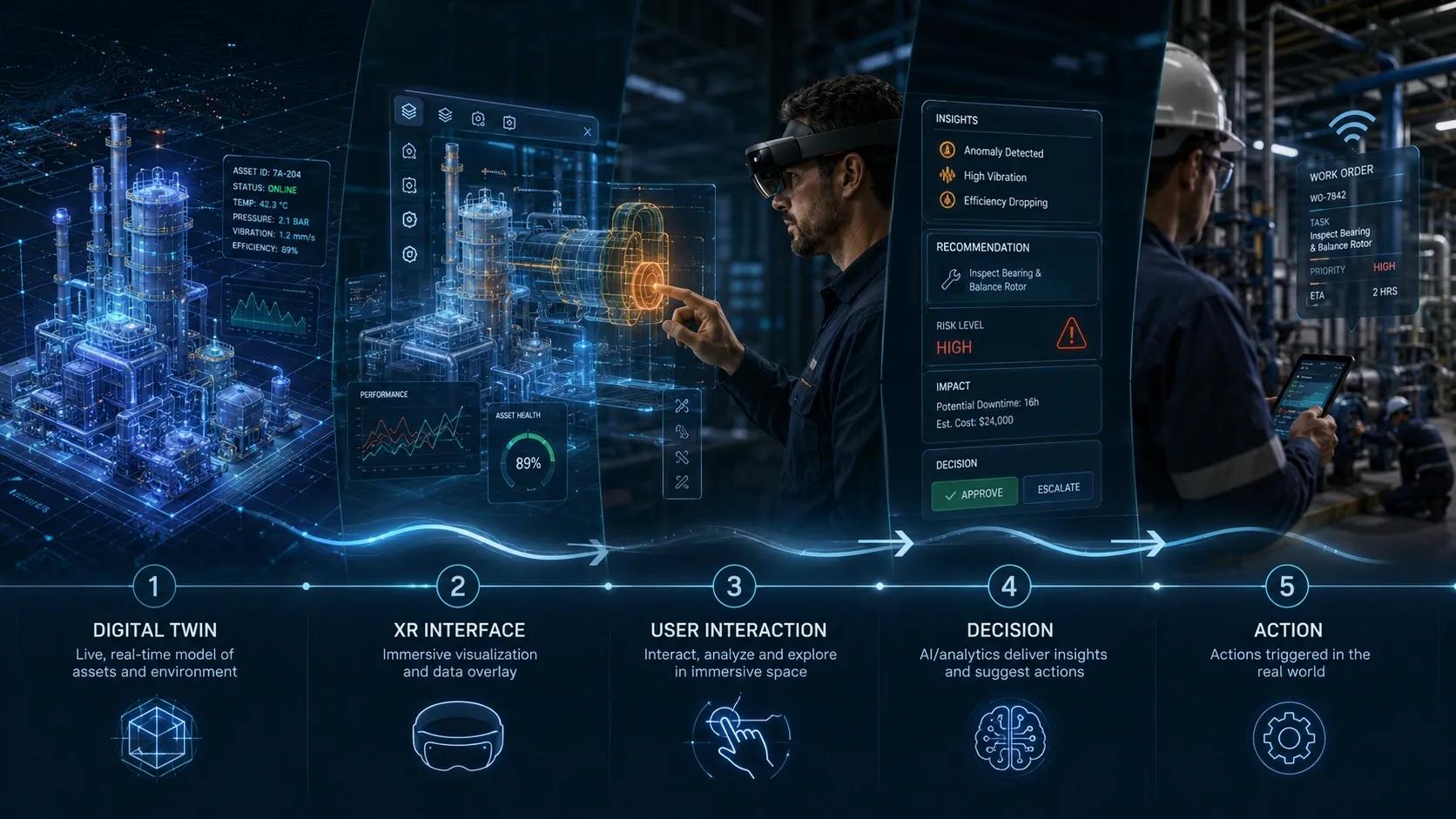
The next leap in Digital Twins is not better dashboards.
It is the ability to step inside the system, interact with it, and make decisions in context .
Introduction: Phase 5 Continuation
In Phase 5, we are looking at the future and strategic direction of Digital Twins.
So far, we explored:
AI-driven autonomous Digital Twins
event-driven architectures for real-time intelligence
Now we move to another major shift:
Digital Twins + XR
XR includes:
Virtual Reality
Augmented Reality
Mixed Reality
For years, Digital Twins have been presented through:
dashboards
3D models
GIS maps
control rooms
analytics screens
These are useful.
But the future is moving beyond visualization toward interaction .
The question is no longer:
👉 Can we see the system?
The new question is:
👉 Can we interact with the system as if we are inside it?
The Core Problem: Visualization Alone Is Not Enough
Most Digital Twin interfaces show:
asset status
alerts
sensor readings
spatial context
performance dashboards
But users still remain outside the system.
They observe.
They interpret.
Then they act through another workflow.
This creates distance between:
👉 insight and action.
XR reduces that distance by allowing users to interact with the Digital Twin directly in spatial context.
What XR Adds to Digital Twins
XR brings Digital Twins closer to the real world.
It allows users to:
walk through a virtual facility
inspect assets remotely
overlay live data on physical equipment
simulate operations before execution
train teams in realistic environments
collaborate across locations
This changes the experience from:
👉 viewing data
To
👉 experiencing the system.
The Shift: From 3D Model to Interactive Environment
A 3D model may show what an asset looks like.
But an XR-enabled Digital Twin can show:
what the asset is doing
what changed
what may happen next
what action is recommended
what the impact will be
That is the difference.
A static model is a representation.
An interactive Digital Twin becomes an operational environment.
Where XR Creates Value
1. Remote Inspection
Instead of sending experts to every site, XR can allow teams to inspect infrastructure remotely.
Example:
A maintenance expert can view a plant, tower, bridge, or facility in 3D with live asset data overlaid.
This supports:
faster diagnosis
reduced travel
better collaboration
improved safety
2. Field Assistance
AR can guide field technicians directly on-site.
A technician wearing AR glasses or using a tablet can see:
asset ID
maintenance history
live sensor readings
safety warnings
step-by-step repair instructions
This improves field execution.
3. Training and Simulation
VR can simulate real operational scenarios without exposing teams to risk.
Examples:
emergency response training
plant shutdown procedures
equipment maintenance
disaster preparedness
safety drills
This is especially useful where mistakes are costly.
4. Design Review and Planning
XR allows stakeholders to experience designs before construction or deployment.
This helps identify:
spatial conflicts
operational constraints
accessibility issues
maintenance challenges
before they become expensive field problems.
5. Command and Control
In complex environments such as:
airports
ports
smart cities
defense systems
utilities
XR can create immersive command environments where decision-makers interact with live operational data spatially.
This improves situational awareness.
Practical Example: Smart Facility Maintenance
A facility Digital Twin detects HVAC inefficiency in one zone.
Traditional interface:
dashboard shows alert
technician checks system manually
action depends on interpretation
XR-enabled Digital Twin:
technician sees the affected zone in AR
faulty equipment is highlighted
live temperature and airflow data appear
maintenance steps are shown
task status updates automatically
This turns the Digital Twin into an execution guide.
Practical Example: Infrastructure Planning
Before constructing a new transport corridor, planners can use XR to simulate:
terrain conditions
utility conflicts
traffic impact
flood risk zones
construction sequencing
Instead of only reviewing maps and drawings, teams can experience the corridor virtually.
This improves decision quality before execution begins.
Why XR Is More Than a Visual Layer
XR should not be treated as a “wow factor.”
That is where many implementations fail.
The value of XR is not only in immersive presentation.
The value is in:
👉 making decisions more contextual, collaborative, and actionable.
If XR only shows a beautiful model, it adds limited value.
If XR connects to:
live data
workflows
simulations
alerts
field tasks
decision logic
then it becomes operational.
Where Most XR + Digital Twin Projects Fail
1. Focus on Visual Impact Instead of Operational Use
Many XR demos look impressive but do not solve real workflow problems.
2. No Live Data Connection
If XR is disconnected from real-time data, it becomes a static walkthrough.
3. Poor Integration with Workflows
If users still need to switch to other systems to act, XR remains separate from operations.
4. Lack of Field Usability
Devices, connectivity, safety, battery life, and user comfort matter.
If XR is difficult to use in real field conditions, adoption suffers.
5. No Clear ROI
Organizations must define whether XR improves:
inspection time
training quality
safety
collaboration
decision speed
rework reduction
Otherwise it remains a showcase tool.
XR Maturity in Digital Twins
Level 1: 3D Visualization
View the model.
Level 2: Data Overlay
See live information on assets.
Level 3: Interaction
Select assets, inspect details, simulate changes.
Level 4: Workflow Integration
Trigger tasks, approvals, inspections, and updates.
Level 5: Immersive Decision Environment
Use XR for real-time collaboration, simulation, and operational control.
The Strategic Opportunity
The future of Digital Twins is not limited to screens.
As systems become more complex, users need better ways to understand and act.
XR can make complexity easier to experience.
For example:
engineers can see hidden utilities underground
operators can view live risk zones in a plant
planners can test city scenarios spatially
field teams can receive guided maintenance support
executives can review infrastructure performance in immersive command rooms
This creates a new interface between humans and complex systems.
Indian Context
In India, XR-enabled Digital Twins can be useful across:
smart cities
metro rail projects
airports
industrial plants
highways
power infrastructure
healthcare campuses
training academies
The immediate opportunity is not full immersive control rooms everywhere.
The practical starting point is:
👉 high-value use cases
Such as:
remote site inspection
safety training
AR-assisted maintenance
BIM-GIS design review
stakeholder communication
infrastructure planning
These can deliver measurable value without requiring full-scale XR transformation from day one.
Benefits of Digital Twins + XR
better situational awareness
improved field execution
faster training
reduced rework
safer inspections
better stakeholder alignment
improved decision-making
stronger user engagement
Conclusion
Digital Twins started as models.
Then they became dashboards.
Now they are becoming interactive decision environments.
XR is not just about making Digital Twins more visual.
It is about making them more usable.
The real shift is:
👉 from seeing the Digital Twin
To
👉 interacting with it in context.
That is where Digital Twins become easier to understand, easier to trust, and easier to act through.